2-WAY SYNCFORGE NATIVE
Atlassian Forge Cloud Native·Zero External Data Egress

Mind Mapping Built for Jira & Confluence

Brainstorm ideas, organize user stories, and turn visual branches into tracked Jira issues in seconds—with seamless interactive Confluence macro embedding.

keyboardKeyboard Flow:Tab & Enter Shortcuts
sync_alt2-Way Jira Sync:Real-Time Updates
descriptionConfluence Macro:Embed in Docs
shield100% Forge Cloud:Zero Data Egress

// SEAMLESSLY INTEGRATED ACROSS THE ATLASSIAN ECOSYSTEM

view_kanban
Jira SoftwareBoards & Backlogs
lightbulb
Jira Product DiscoveryIdea Prioritization
headset_mic
Jira Service ManagementService Queues
article
Confluence Cloud/mindmap Macro
cloud_done
Atlassian Forge100% Zero-Egress
commit
Bitbucket CloudBranch Linking

Turn complex Jira backlogs and Confluence ideas into living visual mind maps.

Visual planning built for agile teams. Turn complex issue hierarchies and sprint backlogs into clear visual mind maps without leaving Jira or Confluence.

// Flow-State Engine

Keyboard-First Brainstorming & Infinite Canvas Engine

Designed for high-velocity software creators, Mind Map Studio eliminates interface friction with full keyboard flow state, dynamic multi-layout graph intelligence, and instant auto-layout balance.
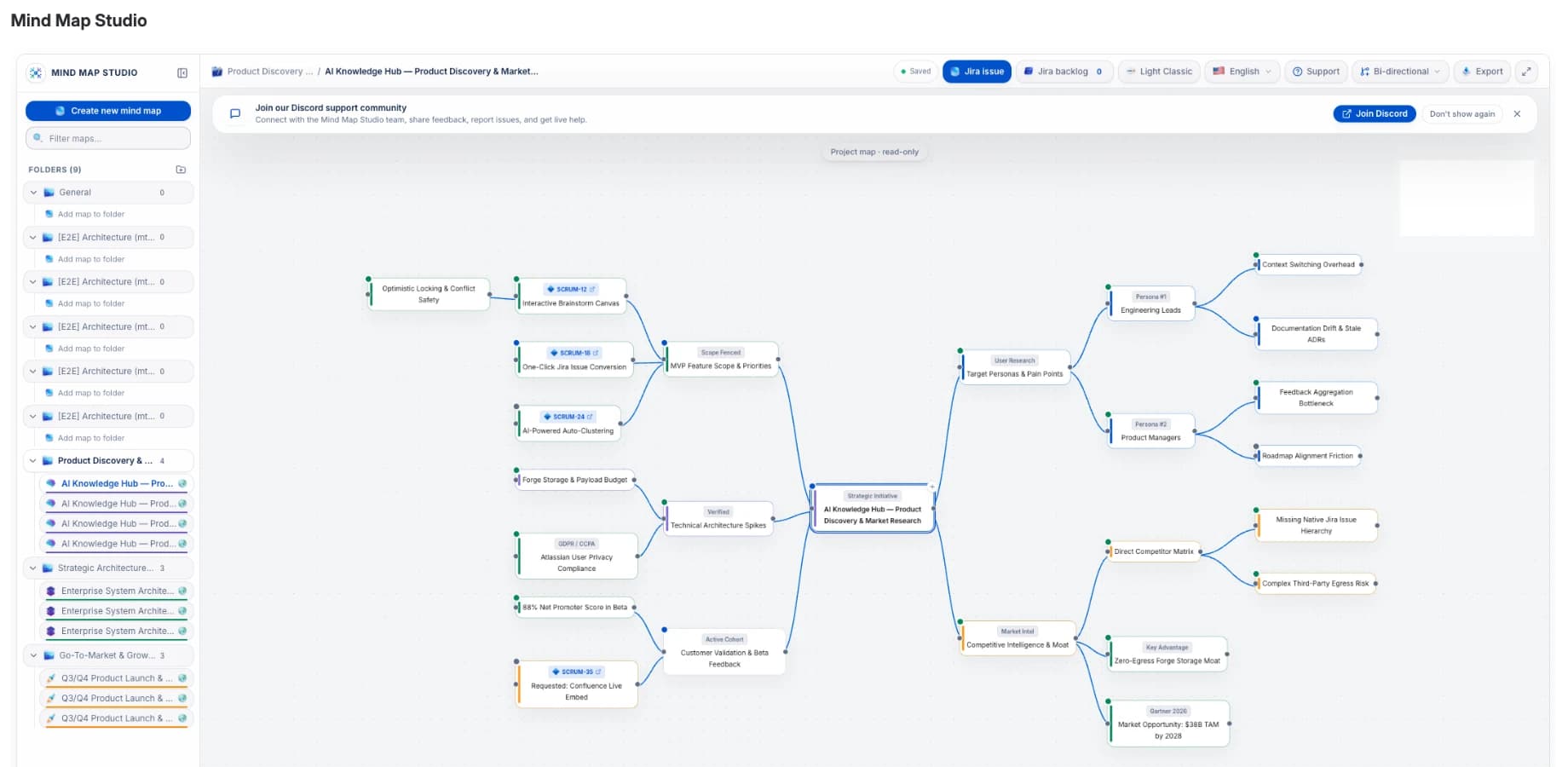
check_circleFlow-State Keyboard Navigation: Spawn child branches with Tab, create siblings with Enter, and jump immediately into inline text editing with F2.
check_circleMulti-Layout Graph Intelligence: Switch dynamically between Bi-directional (Two-Sided Radial) balancing, Horizontal Left-to-Right Mind Map, and Top-Down Tree hierarchy.
check_circleAuto-Layout & Align: One-click re-indexing prevents overlapping branches and maintains mathematical clarity across complex diagrams.
check_circleBranch Collapse & Expand (+N Badges): Collapse sub-trees on massive multi-sprint maps to focus on active topics, complete with clear counters showing hidden sub-nodes.
check_circleRich Node Styling & Curves: Customize connection curve geometry (curved, rounded, angular, straight) and corner radii (square, subtle, soft, rounded).
check_circleCanvas Idea Status Tracking: Tag visual nodes directly as To Do, In Progress, Stalled, or Done before converting them into formal Jira issues.
check_circlePower-User History & Clipboard: Full 50-step deep undo/redo history, copy, cut, paste, and duplicate sub-branches with instant feedback.
Mind Map Studio - Visual Architecture Mind Mapping in Jira Cloud
Flow-State EngineMODULE_01

Keyboard-First Brainstorming & Infinite Canvas Engine

Designed for high-velocity software creators, Mind Map Studio eliminates interface friction with full keyboard flow state, dynamic multi-layout graph intelligence, and instant auto-layout balance.

check_circle
Flow-State Keyboard Navigation: Spawn child branches with Tab, create siblings with Enter, and jump immediately into inline text editing with F2.
check_circle
Multi-Layout Graph Intelligence: Switch dynamically between Bi-directional (Two-Sided Radial) balancing, Horizontal Left-to-Right Mind Map, and Top-Down Tree hierarchy.
check_circle
Auto-Layout & Align: One-click re-indexing prevents overlapping branches and maintains mathematical clarity across complex diagrams.
check_circle
Branch Collapse & Expand (+N Badges): Collapse sub-trees on massive multi-sprint maps to focus on active topics, complete with clear counters showing hidden sub-nodes.
check_circle
Rich Node Styling & Curves: Customize connection curve geometry (curved, rounded, angular, straight) and corner radii (square, subtle, soft, rounded).
check_circle
Canvas Idea Status Tracking: Tag visual nodes directly as To Do, In Progress, Stalled, or Done before converting them into formal Jira issues.
check_circle
Power-User History & Clipboard: Full 50-step deep undo/redo history, copy, cut, paste, and duplicate sub-branches with instant feedback.
bolt
Keyboard Accelerator Matrix
VERIFIED
  • Tab: Create Child Node
  • Enter: Create Sibling Node
  • F2 / Double-Click: Inline Edit
  • Spacebar: Collapse / Expand (+N)
  • ⌘Z / ⌘⇧Z: 50-Step Undo / Redo
  • ⌘D: Duplicate Entire Branch
Bi-Directional SyncMODULE_02

Seamless 2-Way Jira Cloud Backlog Integration

Bridge the gap between discovery and delivery. Access your backlog right inside the canvas, drag existing tickets into tree hierarchies, and turn ideas into Jira Epics and Stories with live status sync.

check_circle
Live Jira Backlog Drawer: Slide out your project backlog directly inside the canvas. Filter by Epics, Stories, Tasks, Bugs, status, or date created with live search.
check_circle
Drag-and-Drop Ticket Linking: Drag Jira issues from the backlog drawer straight onto canvas nodes to build visual dependency trees and user story maps.
check_circle
1-Click Jira Issue Creation: Convert any visual node into a tracked Jira issue or Epic. Set summary, project, issue type, priority, and required fields instantly.
check_circle
Native Jira Dialog Fallback: Need complex custom fields, enterprise issue workflows, or components? Launch the native Jira create modal directly from any node.
check_circle
Live Issue Status Badges: Linked nodes show real-time issue keys, issue type icons, and status badges, linking directly to the full Jira ticket view.
sync_alt
Zero Context Switching
VERIFIED
  • Live Slide-out Project Backlog
  • Instant Epics, Stories & Subtasks
  • Real-Time Two-Way Status Sync
  • Native Atlassian Modal Integration
Confluence Macro SuiteMODULE_03

Confluence Cloud Macro & Live Spec Embedding

Eliminate outdated screenshot attachments. With the native /mindmap Confluence Cloud macro, engineering teams and product managers embed interactive, zoomable, and live-updating visual mind maps directly into Confluence documentation.

check_circle
Native /mindmap Macro Command: Type /mindmap on any Confluence Cloud page to search, select, and embed any shared project diagram seamlessly.
check_circle
Interactive Zoom & Pan Viewer: Stakeholders can pan, zoom, expand/collapse sub-branches, and explore architecture hierarchies directly inside the page without leaving Confluence.
check_circle
1-Click Fullscreen Presentation: Launch full-screen presentation mode for sprint reviews, architectural walkthroughs, and executive alignments.
check_circle
Live Jira Sync in Confluence: When ticket statuses update in Jira, embedded Confluence mind maps reflect the latest progress in real time.
check_circle
Zero Iframe Lag & Forge Security: Renders directly using Atlassian Forge UI runtime without third-party iframe cookies or cross-site tracking.
description
Confluence Living Docs
VERIFIED
  • Native /mindmap Macro Command
  • Interactive Zoom & Pan Embedding
  • 1-Click Fullscreen Presentation
  • Real-Time Jira Status Reflection
Project ArchitectureMODULE_04

Multi-Map Workspaces & Color-Coded Organization

Scale your agile mapping across multiple initiatives with structured folders, custom emblems, live sidebar filtering, and clear project vs. private visibility boundaries.

check_circle
Structured Project Folders: Group your mind maps into custom folders by Epic, sprint cycle, architecture spikes, or squad focus areas.
check_circle
Folder Emblem Styles & Color Coding: Personalize folders with distinct color themes and custom emblems (Classic, Project, Workspace) for immediate visual identification.
check_circle
Instant Map Filtering: Search and filter through dozens of mind maps in the workspace sidebar with sub-millisecond instant search.
check_circle
Public vs. Private Visibility: Share Project-Wide Maps across your entire Jira team, or maintain Private Maps in your personal workspace for early-stage discovery drafts.
folder_special
Workspace Architecture
VERIFIED
  • Project-Wide Shared Maps
  • Private Personal Discovery Drafts
  • Color-Coded Folder Hierarchy
  • Fast Sidebar Search & Filter
Visual Design StudioMODULE_05

Custom Theme Studio & Dual Icon Systems

Deliver stunning, presentation-ready diagrams with automatic Jira Light/Dark mode sync, curated aesthetic themes, custom color builders, and dual icon sets.

check_circle
Automatic Jira Theme Sync: Dynamically adapts to Jira Cloud’s active Light or Dark theme settings for a seamless native look and feel.
check_circle
Curated Built-in Themes: Instantly toggle between Jira Dark, Light Classic, Turbo Neon (electric glow), Dracula, and Nord Frost color schemes.
check_circle
Custom Theme Builder: Craft bespoke palettes: customize canvas backgrounds, node surface colors, connector accents, text contrast, and frosted liquid glass translucency.
check_circle
Dual Icon Sets: Choose between Mind Map Studio’s signature glossy 3D illustrative icons or clean, familiar Atlassian Design System icons.
palette
Preset Themes Available
VERIFIED
  • Jira Dark (Native Atlassian)
  • Light Classic (Clean & Crisp)
  • Turbo Neon (Electric Cyber Glow)
  • Dracula (High-Contrast Dark)
  • Nord Frost (Arctic Engineering)
Enterprise Trust & LocalesMODULE_06

Enterprise Forge Security, 18 Locales & Discord Support

Built 100% on Atlassian Forge with zero external databases. Non-blocking autosave, conflict detection, 18 in-app languages, and direct developer Discord support protect your team and workflow.

check_circle
Native Atlassian Forge Architecture: 100% sandboxed inside Atlassian Cloud. Your data never leaves Atlassian infrastructure and runs strictly under asUser() authenticated permissions.
check_circle
18 Localized In-App UI Languages: Complete in-app user interface translation in English (US), Chinese (Simplified), Czech, Danish, Dutch, Finnish, French, German, Hungarian, Italian, Japanese, Korean, Norwegian, Polish, Portuguese (Brazil), Russian, Spanish, and Swedish.
check_circle
Jira Profile Locale Sync: Automatically inherits each team member’s Atlassian Cloud language profile for instant localized tooltips, menus, and modals.
check_circle
Direct Developer Discord Community: Direct access to community channels, feature votes, and agile exchange with our core engineers (conducted in English).
check_circle
Automated GDPR & Data Privacy Lifecycle: Built-in 7-day registry revalidation and hard account-erasure compliance handlers ensure full GDPR compliance.
check_circle
High-Resolution 2x PNG Export: Export presentation-ready 2x PNG graphics for Confluence pages, sprint reviews, board decks, and technical RFCs.
verified_user
Security & Global Access
VERIFIED
  • Zero External Server Storage
  • asUser() Permission Boundary
  • 18 Localized In-App Languages
  • Direct Engineering Discord Uplink

Product Roadmap & Upcoming Capabilities

Explore what we are currently validating for release and where Mind Map Studio is heading next. This roadmap reflects our active Jira issue tracking backlog.

rocket_launchPHASE_01
Shipped / Live on Marketplace

MVP Release & Core Platform

Production-ready release available directly on Atlassian Marketplace with 30-day evaluation.

Full Internationalization (i18n) Across 18 Languages

Complete UI localization for 18 languages, pluralization handling, and automatic Jira user-profile sync.

Bi-Directional (Two-Sided Radial) Layout

Auto-balances child branches evenly left and right from the root node with one-click layout switching.

Auto-Enter Edit State on Node Creation

Instantly puts new child (Tab) or sibling (Enter) nodes into inline editing for zero-friction keyboard flow.

Dual Icon Pack Selection

User toggle between custom 3D glossy icons and native Atlassian Design System icons.

Enhanced Jira Creation Modal & Project Selector

Enables selecting any accessible Jira project and issue type with strict asUser() security.

Public Map Concurrency Warnings

Informs users on shared maps about single-writer revisions until full multiplayer collaboration lands.

Atlassian Marketplace Listing & Merchant Setup

Official listing publication and payout configuration for Atlassian Marketplace app 881553806.

boltPHASE_02
In Active Development

Agile Planning & Advanced Canvas Capabilities

High-leverage diagramming and backlog management enhancements actively in progress.

Non-Hierarchical Cross-Node Relationships

Draw directed and labeled connection lines between arbitrary nodes across different branches (e.g., Frontend → API, Service A → Kafka → Service B, dependency links).

Bulk Jira Issue Creation via Tabular Modal

Select multiple nodes or an entire branch and batch-create Jira issues in a single preview table with pre-filled summaries, issue types, and parent hierarchies.

Node Hyperlinks, Rich Notes & Attachments

Attach formatted notes, URLs, API specs, and references directly to idea nodes without cluttering the canvas.

Background Image / Email Snapshot Overlay

Upload diagrams, architecture blueprints, or email thread snapshots to serve as a dimmed backdrop layer for visual mapping on top.

CSV Mind Map Export

Export entire hierarchical graphs to CSV for spreadsheet reporting in Excel / Google Sheets.

Custom Tags, Labels, and Priority Flags

Add custom metadata chips, sprint tags, and visual priority badges to individual nodes.

groupsPHASE_03
Roadmap Milestone

Multi-User Collaboration & Granular Permissions

Real-time live war-room presence and role-based sharing controls.

Real-Time Multiplayer Collaboration & Comments

Live co-editing with presence indicators, shared cursors, and node-level discussion threads for team refinement sessions.

Role-Based Access Control (Viewer vs. Editor)

Invite specific users or groups to private/project mind maps with granular Viewer (read-only) or Editor roles.

smart_toyPHASE_04
Roadmap Milestone

AI Intelligence & Developer Integrations

Contextual AI summaries and agentic workflows connecting codebases to canvases.

AI Mind Map Summarization & Q&A Chat (BYOK)

Chat with your mind map to ask questions, extract action items, and generate executive summaries with a Bring-Your-Own-Key (BYOK) privacy-first backend.

Model Context Protocol (MCP) Integration

Expose Forge KVS mind map tools via MCP so IDE AI agents (Cursor, Claude Desktop, Antigravity) can read, generate, and update mind maps directly from codebases.

hubPHASE_05
Roadmap Milestone

Platform Expansion & Ecosystem Integrations

Extending Mind Map Studio to Confluence and broader enterprise platforms.

Atlassian Confluence Macro Embedding

Embed interactive, live-syncing Mind Map Studio diagrams directly inside Confluence documentation pages.

In-App "What's New" Changelog Modal

Interactive release notes drawer notifying users of newly shipped features upon version updates.

ServiceNow Store Integration Investigation

Architecture exploration for bringing Mind Map Studio to the ServiceNow ecosystem.

Global by Design: 18 App Languages Built-In

The Mind Map Studio application interface automatically detects and adopts each team member's individual Atlassian Cloud language preferences. From canvas tooltips to epic breakdown prompts and Confluence macro dialogues, navigate the app seamlessly in your native language.

info

Automatic Jira Profile Language Detection

App interface automatically syncs with your Jira & Confluence profile · Support desk operates in English & German · Zero configuration required
FAQ & TRUST

Frequently Asked Questions

Key answers regarding data residency, Forge architecture, and Jira integration.

Mind Map Studio uses real-time bi-directional synchronization powered by Atlassian Forge. Any status change, title rename, or assignee update made on the canvas immediately updates Jira, and vice versa.
D
Developer & Community UplinkLive

Join the Mind Map Studio Discord Community

Have questions or feature requests? Connect directly with our core maintainers, vote on upcoming roadmap milestones (including multiplayer real-time co-editing), and exchange custom theme palettes with agile practitioners worldwide.

chatDirect access to the core engineering team, feature votes, and agile knowledge sharing.
·
boltFeedback & Voting
·
updateRelease Updates

Take Jira to the next level

Install Mind Map Studio directly from the Atlassian Marketplace. 100% Forge native with zero external data egress.